
Blood Demon Arts
Slayers 2 Shockwave Blood Demon Art: Moves & Counters
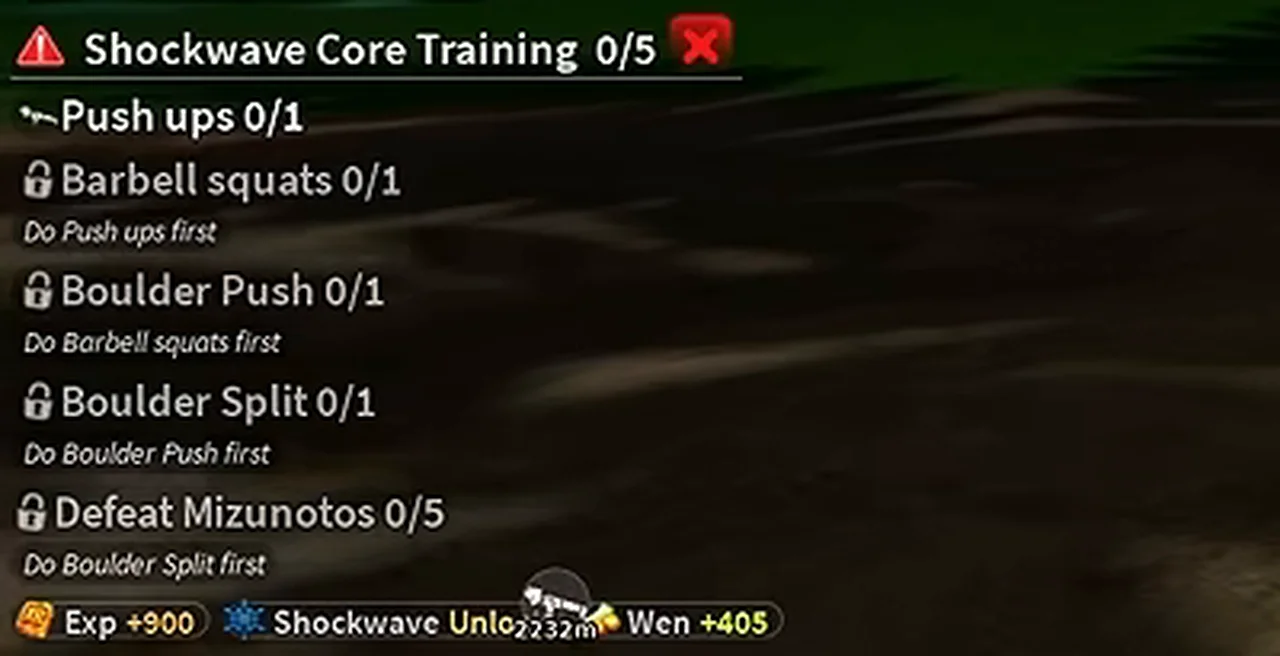
To learn Shockwave in Slayers 2 (formerly Project Slayers 2), become a Demon, get its Orb through Muzan’s power roll or chest loot, and use it to start Shockwave Core Training. Complete Push ups, Barbell squats, Boulder Push, Boulder Split and Defeat Mizunotos in that order. After training, open the Shockwave skill-tree branch and unlock individual moves.
On this page
Muzan route and the Shockwave Orb
Muzan offers Blood Demon Art rolls inside his lair. After becoming a Demon, equip the Biwa Bell and use it to return to him. Choose Give me your power to open the art roll panel.
An Orb from chest loot can start the same training route. Read the item’s use prompt and match it to Shockwave Core Training before using it.
Night search for a first invitation; Biwa Bell return route for a Demon.
Muzan NPC guideKeep conversion, power rolls and hunt tasks separate.
- Complete the Demon conversion quest and use Muzan’s Blood if your character is still human.
- For Muzan’s roll, enter his lair with the Biwa Bell, talk to Muzan and select Give me your power. Inspect the required roll resource before confirming.
- Check the result in inventory. Pick the Orb for Shockwave, or claim a suitable Orb from a boss chest; keep a skill scroll separate from the Orb.
- Equip the Orb and use its item action. On the default PC layout, click M1 while holding it. Confirm the tracker title is Shockwave Core Training.
- Start the first unlocked objective below. Finish each row before traveling to the next marker.
Complete Shockwave Core Training in order
The next exercise stays locked until the previous objective registers. Use the active task marker and completed row before moving on.
| Step | Objective | Where to go | How to finish |
|---|---|---|---|
| 1 | Push ups | Butterfly Estate Pushups mat | Use the Pushups interaction on the dark mat and click as the shrinking ring meets the outer ring. Check the row completes before starting the next task. |
| 2 | Barbell squats | Outdoor squat rack at the training area | Follow the Barbell squats marker to the rack. Keep the indicator inside the green zone until the activity completes. |
| 3 | Boulder Push | Fenced course near the Boulder Split station | Guide the boulder through the open lanes toward the blue destination. Zoom out at blocked turns to find the route around the fence. |
| 4 | Boulder Split | Rope-wrapped boulders below Windy Peak | Start Boulder Split Train, drag with the moving circles and survive the timer. The exercise uses the on-screen circles rather than weapon swings. |
| 5 | Defeat Mizunotos (5) | Active Mizunoto quest marker; Mistfall Harbor route | Fight the Mizunoto Slayer enemies after the earlier exercises are complete. Check the named kill counter; a trainee boss is a different objective. |
Shockwave training checklist
Check the completed rows and the art unlock reward before opening Skill Tree. A locked row names the preceding exercise you still need to finish.
Open the walkthrough for each exercise
Use the Pushups interaction on the dark mat and click as the shrinking ring meets the outer ring. Check the row completes before starting the next task.
Boulder Push walkthroughGuide the boulder through the open lanes toward the blue destination. Zoom out at blocked turns to find the route around the fence.
Boulder Split walkthroughStart Boulder Split Train, drag with the moving circles and survive the timer. The exercise uses the on-screen circles rather than weapon swings.
Unlock Shockwave moves after training
A Boss skill scroll unlocks a later technique; it does not replace the Orb or Core Training. Read the selected node’s Boss and scroll requirements after learning the preceding moves.
- Complete the final Mizunoto counter and check the Shockwave unlock and mastery bar.
- Open M → Skill Tree on PC and find the Shockwave branch.
- Select the first available move, read its point and prerequisite requirements, and unlock it.
- Use learned moves to build the art’s mastery. Inspect each next node for its own mastery, points and prerequisites before spending.
- Select the combat slot carrying the art and check the learned moves on the hotbar. Inspect the equipped weapon if the art row is missing.
If Shockwave training or moves do not work
| Problem | Next action |
|---|---|
| Muzan offers conversion instead of power | Finish the conversion quest and use Muzan’s Blood, then return with the Biwa Bell. |
| An existing art blocks the new Orb | Read the current art replacement/reset prompt and its effects before removing your trained art. Keep the desired Orb ready. |
| The next exercise stays locked | Return to the preceding objective and confirm its completion row. Starting an activity is different from finishing it. |
| Mizunoto kills are not registering | Check the active row says Defeat Mizunotos and the earlier exercises are complete. Follow its marker and watch the counter after each fight. |
| Core Training ended but the hotbar is empty | Open the art branch and unlock a move node, then select the combat slot that carries it. |
Learn the current kit by purpose
The Shockwave skill tree includes Air Type, Compass Needle, Explosive Fury, Flashing Willow and Annihilation Type, with a Chaotic Afterglow variant. Practice the ranged opening, counter, moving barrage and slam separately before trying a long sequence.
The tap slam is a shorter commitment; holding retains the jump into slam. Hyper armor can prevent interruption during the downward attack, but it does not stop incoming damage.
Do not stack counters as separate safety nets
Shockwave's counter can break hyper armor and improve its following pressure. In the current system all counters share a cooldown, so using a different counter first can lock this answer out. Check the cooldown display before you commit to a close exchange.
The steerable barrage rewards correcting your angle as the target moves. A stun opener improves the chance of a follow-up, but a gap between hits still gives the opponent a chance to recover guard.
Continue your journey
Find more guides in the Slayers 2 Wiki & Database.